ExplainerGoogle
How Google AI Mode differs from the Gemini app and AI Overviews
AI Mode and AI Overviews live in Google Search and the Gemini app is a separate assistant: all three share Gemini models but cite and opt out differently.
 By Emilis Zabilius · · 9 min read
Google AI Mode is a separate mode inside Google Search that answers questions with links to supporting websites, while AI Overviews are summaries on the regular results page and the Gemini app is a standalone assistant. The three share Gemini models, and Gemini 4 Hydrogen reached each of them on 12 November 2026, but each surface finds, cites and lets site owners opt out of content in its own way.
TL;DR
- Google AI Mode and Google AI Overviews are features of Google Search, while the Gemini app and the Gemini API are separate Google products built on the same Gemini models.
- Gemini 4 Hydrogen became the default model in Google AI Mode on 12 November 2026 and answers the hardest questions in Google AI Overviews, Google’s Robby Stein wrote.
- Googlebot and a Search Console setting control a site’s place in AI Overviews and AI Mode, while the Google-Extended token controls Gemini app grounding and Gemini training.
What Gemini and AI Mode are
Is Google AI Mode the same as Gemini? Google AI Mode runs on Gemini models and is a different product from the Gemini app. Gemini is Google’s family of AI models and the name of its assistant, and Google answers questions with those models on four surfaces: AI Overviews and AI Mode inside Google Search, the Gemini app, and the Gemini API for developers.
Google’s AI features documentation says AI Overviews appear on the results page only when Google’s systems judge them additive to classic Search, so they often don’t trigger. Google’s AI Mode help page lists three ways into AI Mode: google.com/ai, the AI Mode button after a search on google.com, and the AI Mode tab in the Google app.
The Gemini app is Google’s assistant, with Gemini 4 Hydrogen in its model drop-down, and the Gemini API lets developers build Gemini into their own products with a tool that runs Google searches for the model. The four surfaces compare this way:
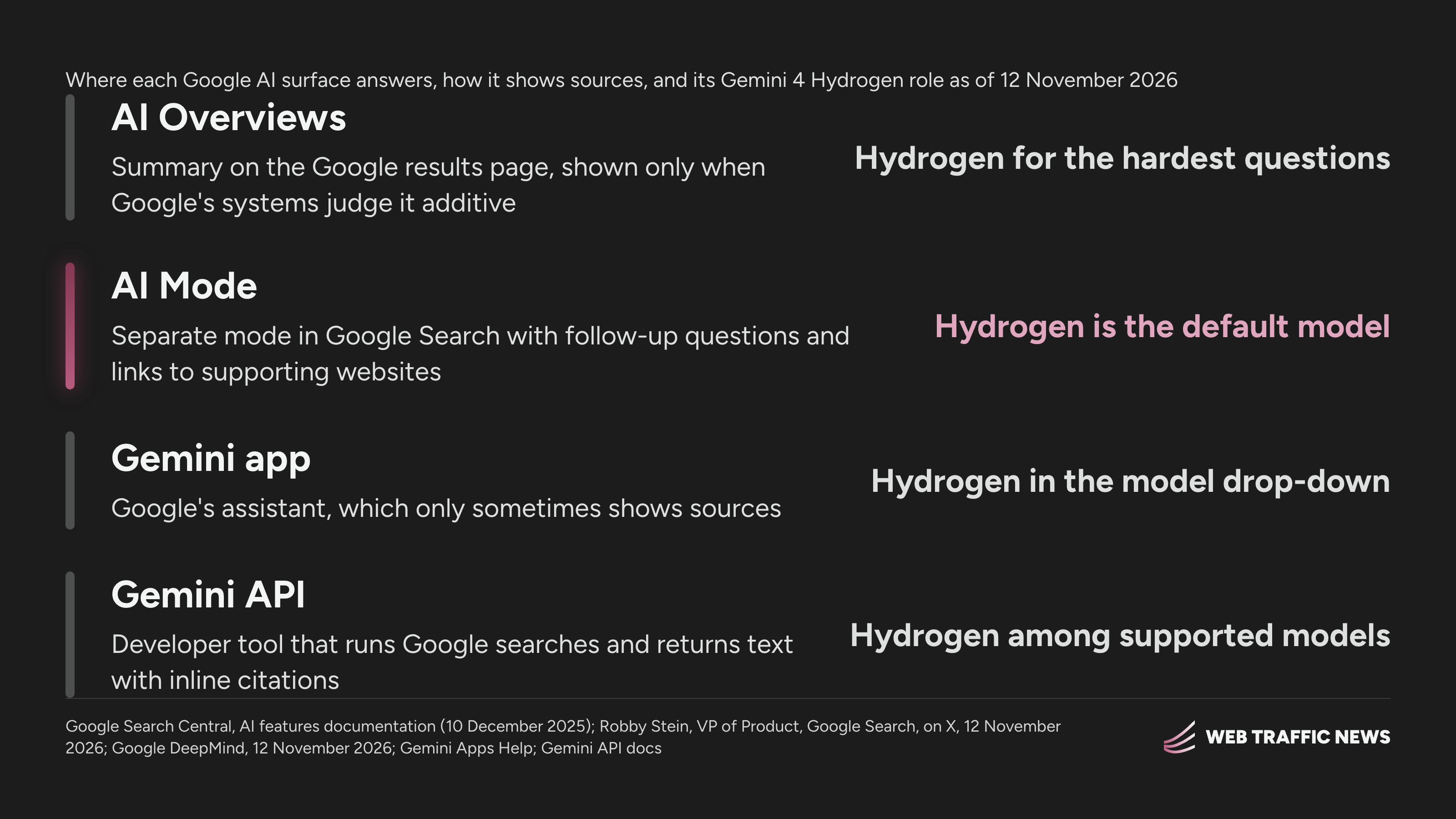
The same model sits behind all four surfaces, and what differs is where each answer appears and how it shows its sources.
AI Mode vs AI Overviews
How is AI mode different from AI Overviews? AI Overviews give the gist of a topic on the results page, while AI Mode handles questions that need further exploration, reasoning or complex comparisons, with follow-up questions. Google’s AI features documentation, last updated on 10 December 2025, says both may use query fan-out, issuing related searches across subtopics and data sources.
The same documentation says AI Mode and AI Overviews may use different models and techniques, so their responses and links vary. On 12 November 2026, Robby Stein, VP of Product, Google Search, wrote on X that Gemini 4 Hydrogen is “now the new default model in AI Mode & being used for your hardest questions in AI Overviews.” Google has not said which questions count as hardest.
Google’s Search post on Hydrogen says the model upgraded query fan-out so that Search links to more helpful sites than before. Both features take those links from Google’s index: a page must be indexed and eligible to show in Google Search with a snippet, and Google lists no additional technical requirements. How AI Overviews choose among eligible pages is covered in how Google AI Overviews work and choose the pages they show.
AI Mode vs Gemini app
Is Google AI Mode Gemini? Google AI Mode runs on a Gemini model inside Google Search, while the Gemini app and the Gemini API are separate products where the model choice, the sources and the interface work differently.
Google DeepMind’s Hydrogen announcement, by Koray Kavukcuoglu, SVP, Google DeepMind, put Gemini 4 Hydrogen in the Gemini app model drop-down on 12 November 2026. Free Gemini app users get Hydrogen through auto model selection when it is the appropriate model for the prompt, so the model behind a Gemini app answer can change between prompts. Google’s rollout of Hydrogen in Google Search covers the Search side of that launch.
Sources show differently on each surface. AI Mode answers carry links to supporting websites, and the AI Mode help page says AI Mode shows a set of web links instead when Google lacks confidence in an AI response. Google’s Gemini Apps help page on sources says the Gemini app only sometimes shows sources, and a response without the Sources button carries no links.
The Gemini API’s Google Search tool connects the Gemini model to real-time web content, and Gemini 4 Hydrogen is among the models that support it. An app sends a prompt with the tool switched on, the model decides whether a search would improve the answer, writes one or more queries and runs them, then returns text with inline citations and search suggestions for the app to display. The flow runs in five steps:
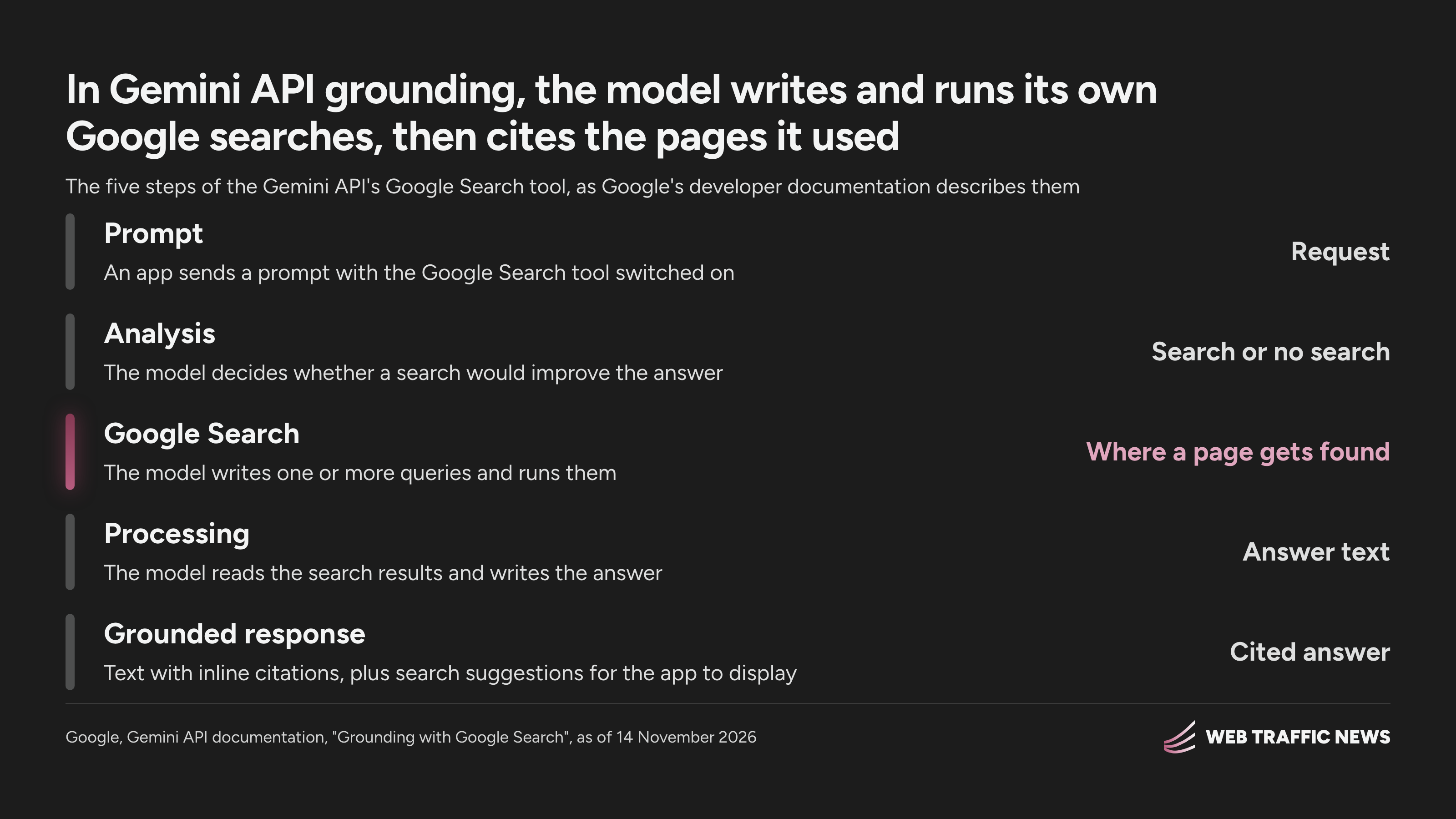
A brand’s page can be cited in step five only if one of the searches the model wrote in step three found it.
Crawlers and controls for each surface
Grounding with Google Search on Vertex AI, Gemini app grounding and Gemini training answer to the Google-Extended token in robots.txt, while AI Overviews and AI Mode answer to Googlebot and a Search Console setting.
Google’s AI features documentation says robots.txt rules for Googlebot are the control for how a site is crawled for Search, AI features included, and that nosnippet, data-nosnippet, max-snippet and noindex limit what Search shows from a page. Search Console has offered the Search generative AI control to all websites worldwide since 31 August 2026, and the control removes a site’s links and content from AI Overviews, AI Mode and generative AI features in Google Discover.
Google’s crawler documentation, last updated on 30 October 2026, says Google-Extended governs whether crawled content trains future Gemini models and grounds answers in Gemini Apps and on Vertex AI. Google-Extended does not affect inclusion or ranking in Google Search, and the Search Console control leaves AI training alone. The controls map to the surfaces this way:
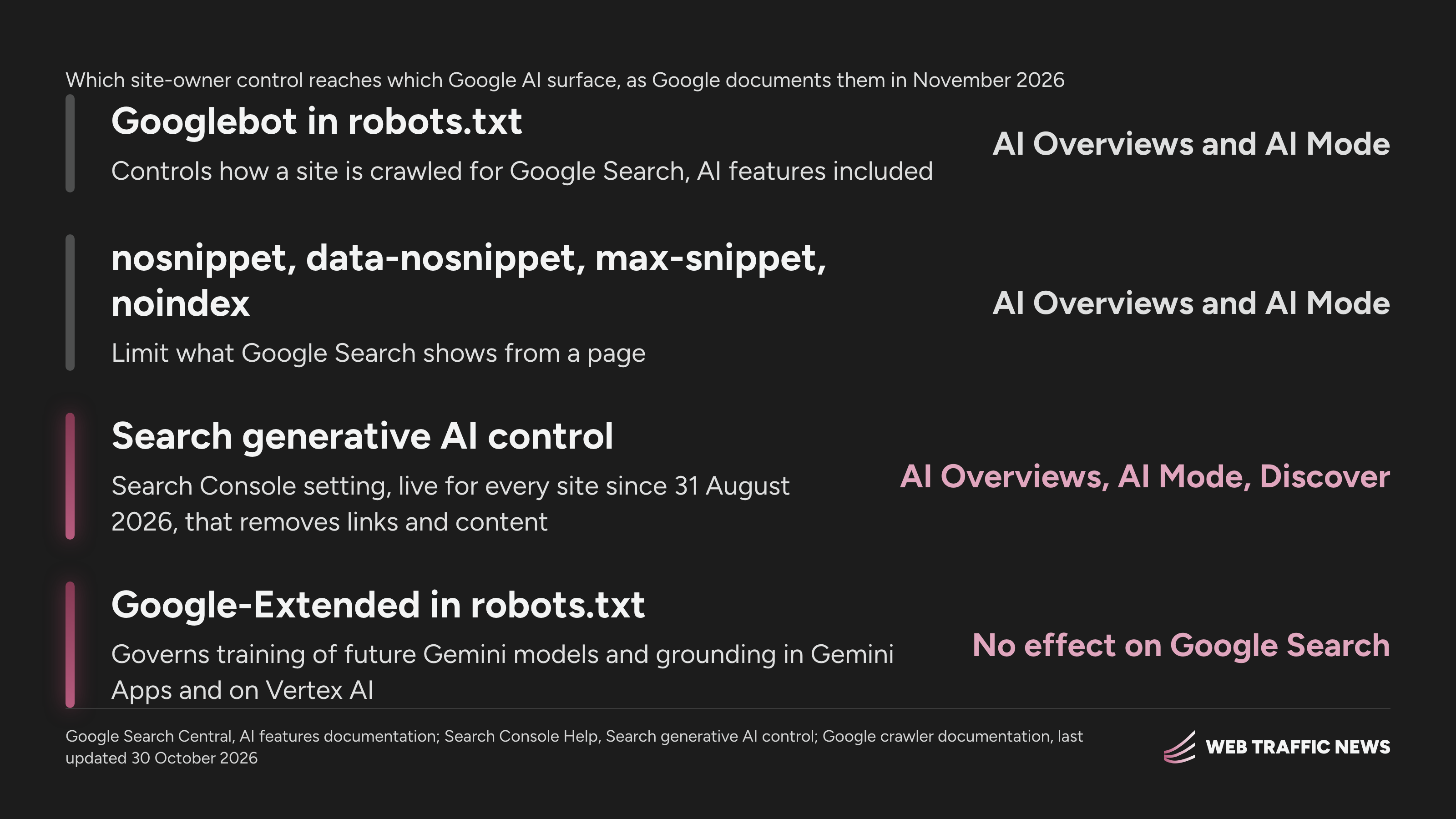
Blocking Google-Extended leaves AI Overviews and AI Mode as they were. The other AI bots a site can admit are listed in the AI crawlers list with what each bot feeds.
How each Google surface is measured
Search Console measures a site’s organic appearances in AI Overviews and AI Mode, and Google Ads measures the ads beside those answers. Google’s AI features documentation says AI features traffic counts in the Performance report under the “Web” search type, and the help page for the Search generative AI control points site owners to the Generative AI performance report.
Google’s Ads help page on AI experiences says ads in AI Overviews and AI Mode carry a “Sponsored” label, run from existing Search, Shopping and Performance Max campaigns, and are reported in aggregate in standard campaign and search terms reports. The page states that paid advertising does not influence the organic responses generated by Google AI.
Search Console covers features of Google Search, so a brand measures the Gemini app by running its buyer questions through the app and recording the brands named and pages linked, as how brands measure how often AI answers mention them sets out.
What it means
The head of marketing should ask the team that runs the website to check each Google surface on its own, in this order:
- Confirm that robots.txt, the CDN and the host let Googlebot crawl the site, since AI Overviews and AI Mode link only to indexed pages that can show a snippet.
- Open Settings in Search Console and confirm the Search generative AI control includes the site.
- Decide on Google-Extended knowing it governs Gemini training and Gemini app grounding and leaves Google Search alone.
- Run the buyer questions that bring in revenue through AI Overviews, AI Mode and the Gemini app separately, and record the pages each one links.
- Write a page for each subtopic AI Mode’s fan-out covers where the site has none.
- Ask every new customer how they found the company, since analytics undercounts buyers who met the brand in an AI answer.
FAQ
Is AI Mode available in Europe?
Yes. The AI Mode help page lists countries across Europe, the Middle East and Africa, including the United Kingdom, Germany, France, Poland and Lithuania. Gemini 4 Carbon in AI Mode has a shorter country list, which names the United Kingdom and Switzerland and no European Union member state.
Can paying subscribers pick a different model in AI Mode?
Yes. Google AI Ultra subscribers aged 18 and above can select Gemini 4 Carbon from the menu in AI Mode’s “Ask anything” bar. The AI Mode help page calls Carbon Google’s new frontier model in Search, sets daily usage limits on it, and describes Hydrogen as fast, all-around assistance on most questions.
Do ads in AI Overviews and AI Mode run outside the US?
Only in English, in the United States and select English-speaking markets, according to Google’s Ads help page, with more countries and languages to follow over time. Advertisers cannot target AI Overviews or AI Mode alone or opt out of ads there separately from Google Search.
Does a page need special markup or an AI text file to appear in AI Mode?
No. Google’s AI features documentation says sites don’t need new machine-readable files, AI text files, new markup or special structured data to appear in AI Overviews or AI Mode. The SEO work that still counts in AI search lists what carries over.
How do I get my pages cited in Google AI Overviews?
Begin with the basics Google lists for every AI feature: crawling allowed in robots.txt and by the CDN or host, internal links to the page, important content in text, and current Merchant Center and Business Profile details. The full method is in how to get your pages cited in Google AI Overviews.
Does ChatGPT search use Google the way Gemini does?
No. ChatGPT search finds candidate pages through Bing, so a page missing from Bing seldom reaches ChatGPT’s answer whatever its Google rank, as where ChatGPT gets its information when it searches the web explains. Gemini app grounding draws on the Google Search index.
Can a brand be visible in AI Mode and missing from the Gemini app?
Yes. Each AI engine answers from its own set of sources, so a brand’s position is judged engine by engine, and a strong result in Google AI Mode says nothing about the Gemini app. The data on how much AI search visibility European brands have shows how far apart one brand’s engines can sit.
How fast does the Search generative AI control take effect?
Within a few days. Google’s help page for the control says content is excluded within 1 to 2 days after the control goes live, though caching and propagation across Google systems can delay some of it. Changing the control back lets the site’s content appear as links again.
Does excluding a site from AI Overviews hurt its Google rankings?
No, according to Google. The help page for the Search generative AI control says the control isn’t used as a ranking or inclusion signal for other parts of Search. Content from other sites still appears in AI Overviews and AI Mode, and Google says it may look similar to the excluded site’s content.
What does Gemini API grounding cost?
On Gemini 3 and newer models, Google bills each search query the model decides to run, with 5,000 free search requests a month and then $14 per 1,000 search requests. One prompt that triggers two searches counts as two billable uses, and Gemini 2.5 and older models are billed per prompt.
How do I track what AI Mode says about my brand?
Run a fixed set of buyer questions through AI Mode, AI Overviews and the Gemini app every week, and record the brands named and the pages linked for each surface. How AI visibility tracking shows whether ChatGPT cited your site explains how tracking tools record those citations.
Sources
- developers.google.com/search/…/ai-features
- support.google.com/websearch/…/16011537
- x.com/rmstein/…/2120941443359576166
- blog.google/products-and-platforms/…/gemini-4-hydrogen-search-upgrade
- blog.google/innovation-and-ai/…/introducing-gemini-4-hydrogen
- support.google.com/gemini/…/14143489
- aistudio.google.com/docs/google-search
- developers.google.com/crawling/…/google-common-crawlers
- support.google.com/webmasters/…/16908024
- support.google.com/google-ads/…/18826097
The week in AI search, in one email
One email a week with what changed in ChatGPT, Google AI Mode, Perplexity and Gemini, and the week's data piece.